Could the most capable fish finder still be the wrong choice for your boat? Yes, if its sonar, transducer or networking features don’t suit the way you fish or the equipment already aboard. With several Lowrance models and technical terms to compare, it helps to start with practical needs rather than the longest feature list.
Consider your boat, fishing routine and existing electronics first. A straightforward standalone display may suit occasional trips, while a networked system can offer more options if you’re building a wider electronics setup. Compass Marine is a Lowrance agent, and its marine store stocks fish finders for boat owners considering an upgrade.
This guide compares the Eagle, Elite FS and HDS PRO ranges, and explains sonar and imaging features, transducer fit, charts, modules and compatibility. Use it to narrow your options by boat layout and fishing style, then check the exact model’s documentation before choosing. The aim is a setup that suits your needs, not a feature list you may never use.
Key Takeaways
- Start with your boat, usual fishing and operating conditions. Separate essential features from optional extras.
- Sonar helps you interpret what lies beneath the vessel, but readings support your decisions rather than guarantee a catch.
- Compare the unit’s sonar capabilities with its transducer requirements and check the specific model documentation for compatibility.
- Before choosing, review your existing electronics, available mounting space and any accessories the setup may require.
- Compass Marine is a Lowrance agent with fish finders in its marine store.
What Does a Lowrance Fish Finder Show, and What Does It Not Tell You?
A fish finder displays information gathered by sonar beneath a vessel. A transducer sends out sonar signals and receives the returning echoes. The unit processes those returns into a screen view that, depending on the equipment and setup, can show depth, possible fish targets and underwater structure. It’s an aid to observation, not a promise of a catch or a definitive identification of everything below the boat.
Use the display alongside your knowledge of the water and conditions. A depth reading can help you understand the water beneath the vessel, while screen marks may indicate objects or changes in the underwater environment. Those marks need interpretation. A symbol isn’t certain proof of a fish, a particular species or a productive spot.
How sonar readings help anglers understand what is beneath the boat
The screen visualises sonar returns to help you build a picture of what lies below as the boat moves. A changing depth reading or a visible mark, for example, may prompt you to adjust where you fish or pay closer attention to your surroundings. For a plain-language overview of how fish finders work, see this general explanation of the technology and its uses.
Readings depend on more than the display. The transducer, equipment settings, installation and operating conditions can all affect the information shown. Water movement and the boat’s position also matter. If the screen looks different from what you expect, don’t treat one reading as conclusive. Review the unit’s guidance and consider the conditions in which the reading was taken.
Fish finder, chartplotter and combined system: what is the difference?
A fish finder displays sonar information. A chartplotter displays chart data to help you understand your position and plan or follow a route. A combined system may bring sonar and chart functions together on one display. Capabilities vary by model, so the product range name alone doesn’t tell you which functions are included.
Keep these information sources distinct. Sonar helps you interpret returns beneath the vessel; a chart shows mapped information about the area. A chart doesn’t confirm what sonar is detecting, and a sonar return isn’t a substitute for navigation charts. When comparing Lowrance fish finders, identify the functions you need and check the exact model documentation for its capabilities, chart support and operating guidance.
A common buying mistake is assuming that a screen showing sonar will also provide the charting or navigation functions you expect. Check the model’s manual and product documentation before relying on a particular feature. Use the equipment as the manufacturer describes, and treat sonar and chart information as aids to judgement, not guarantees of conditions or results.
How to Match a Lowrance Fishfinder to Your Boat and Fishing
Start with how you use your boat, not the number of features on the box. A unit for occasional fishing from a small trailer boat has different practical demands from electronics used on a larger vessel for regular trips. Let your fishing routine, typical waters, mounting position and the information you need underway guide your shortlist.
Sonar uses sound signals and returning echoes to gather information underwater. This sonar technology overview can help make the terminology easier to follow. The right equipment still depends on the boat, the fishing activity and the manufacturer’s documentation, so don’t assume one model or setup suits every vessel.
Which boat and fishing details should guide your choice?
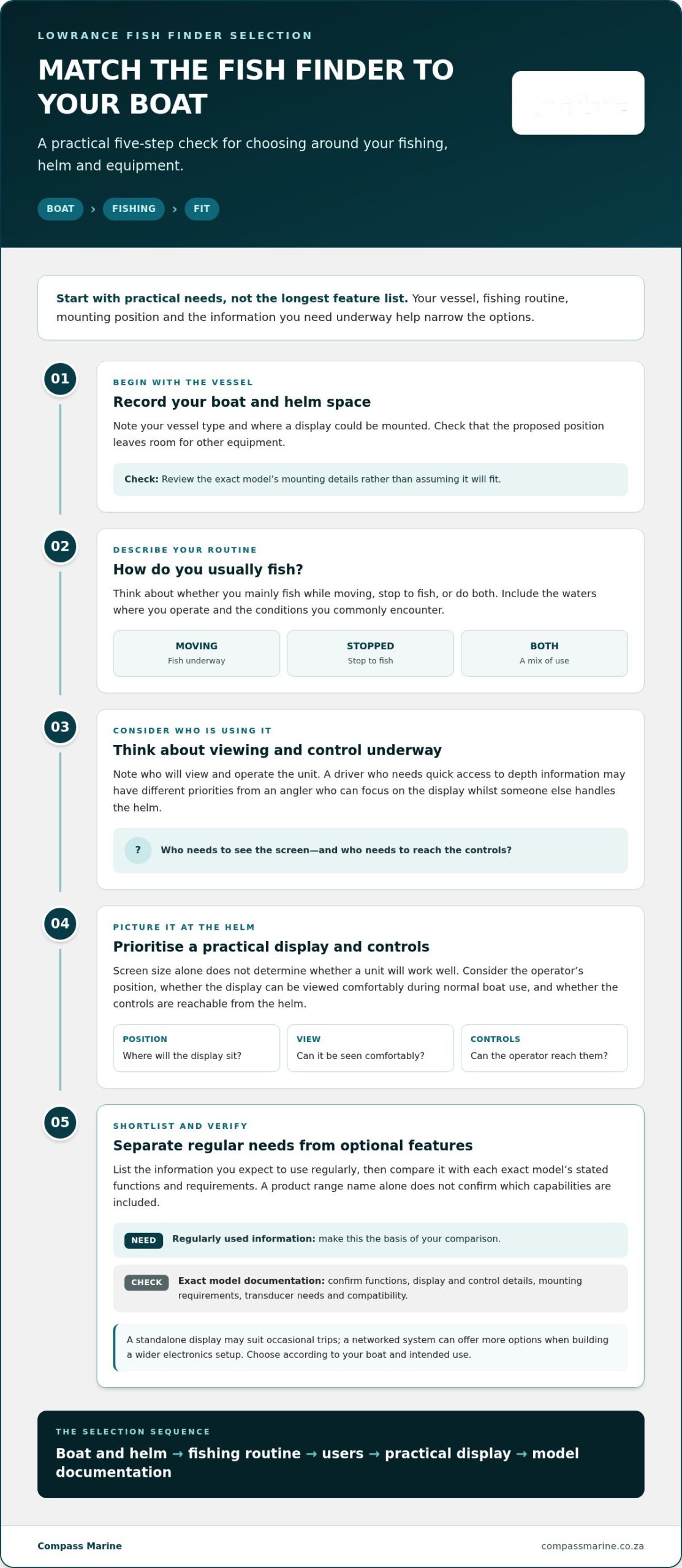
Record your vessel type and where a display could be mounted before comparing models. Note whether you mainly fish while moving, stop to fish, or do both. Consider who will use the unit and what they need to see while operating the boat. A driver who needs quick access to depth information may have different priorities from an angler who can focus on the display while someone else handles the helm.
Think about real operating conditions, too. Space at the helm, exposure to spray and how you use the boat all affect what will be practical. Check your boat’s guidance and the unit’s documentation for installation and use requirements rather than assuming components will fit or work together.
Which display and controls will be practical aboard?
Screen size alone doesn’t determine whether a unit will work well at your helm. Consider where the display will sit, the operator’s usual position and whether it can be viewed comfortably during normal boat use. Compare the controls and information shown in each model’s documentation. Features are useful when they make a specific onboard task clearer, not simply because they sound advanced.
Picture the unit in use before choosing. Can the operator reach the controls from the helm? Will the proposed mounting position leave enough room for other equipment? Check the model-specific display, control and mounting details rather than inferring them from the product range name.
Use this checklist to compare options consistently:
- Vessel: Record the boat type and available display position.
- Fishing: Describe your usual activity and the waters where you operate.
- Users: Note who will view and control the unit while underway.
- Needs: Separate information you’ll use regularly from optional capabilities.
- Documentation: Compare the exact model’s stated functions and requirements.
This approach helps you assess practical fit before checking transducer requirements and compatibility. Compass Marine is a Lowrance agent with fish finders in its marine store. You can explore Lowrance fish finders with your boat and intended use in mind.
Lowrance Sonar and Transducer Features: What Should You Compare?
Feature names are easier to assess when you connect each one to a task. Sonar describes information gathered from sound returns; the transducer sends and receives those signals. Mapping relates to chart information, while networking concerns how compatible equipment can connect. These are different considerations, even when they appear together in a product description.
Use Lowrance’s descriptions to understand terms such as CHIRP, FishReveal, Active Imaging and ActiveTarget, then check the exact model documentation for what is included and whether additional equipment is required. A feature name alone doesn’t establish what a particular unit can do or guarantee fish detection, identification or a better catch. The manufacturer’s Lowrance fish finder features information is a useful starting point for understanding its terminology.
How to compare sonar technologies without getting lost in feature names
Compare capabilities by asking what information you want to see, rather than choosing the unit with the most labels. Decide whether you need a basic sonar view, additional views of underwater structure, or a live sonar capability. Then verify that the specific model supports the function and whether it requires a compatible transducer or another component.
| Capability | Intended use | Model documentation to consult |
|---|---|---|
| Sonar modes, including CHIRP | Viewing sonar information for general awareness beneath the boat | Supported sonar modes, compatible transducer and operating guidance |
| Imaging features, such as Active Imaging or FishReveal | Considering additional ways to view sonar information and underwater structure | Exact imaging functions, compatible equipment and any module requirements |
| Live sonar, such as ActiveTarget | Assessing whether live sonar is relevant to your fishing approach | Supported system components, transducer requirements and connection details |
| Mapping and charts | Reviewing chart information separately from sonar returns | Chart functions, included mapping and supported chart options |
| Networking | Planning connections with other compatible marine electronics | Supported connections, compatible devices and system requirements |
Why transducer configuration and compatibility need attention
The transducer is central to sonar operation: it transmits signals and receives the returning information for the display to process. A display’s advertised functions don’t, by themselves, tell you which transducer configuration is required. Compare the configurations specified for the model you’re considering, and consult its manual for compatibility and vessel-related requirements.
Check whether the proposed unit matches the transducer and other electronics already aboard, or whether the setup calls for additional compatible equipment. Keep mapping and networking questions separate from sonar selection: chart support doesn’t establish sonar capability, and a network connection doesn’t automatically make every device compatible. Follow the manufacturer’s documentation for the specific model and components.
What to Check Before Buying a Lowrance Fish Finder
A careful pre-purchase check can prevent a mismatch between the unit you choose and the space or equipment aboard your boat. Before deciding, work through your intended use, vessel layout, existing electronics, compatibility, documentation and any additional accessories. The manufacturer’s current product information and manual are the references for exact functions and fit.
A practical pre-purchase checklist for your vessel
Compare shortlisted units against the same needs, rather than letting an unfamiliar feature name make the decision for you.
- Define the use. Write down your usual fishing activity and the information the operator needs on screen. Be specific about what you expect the unit to help you observe.
- Review the vessel setup. Note the boat type, existing electronics and available mounting position. Measure the space and consider whether the display can sit where the operator can use it without obstructing other equipment.
- List the equipment involved. Record any existing transducer, display or other electronics you hope to retain. Include model details where available, as similar-sounding equipment names don’t prove compatibility.
- Check compatibility. Compare your existing components with the requirements documented for each shortlisted model. Identify whether the setup depends on particular accessories or additional equipment.
- Read the model documentation. Check the current product information and relevant manual for supported functions, installation guidance and stated system requirements. Resolve any gap before choosing, rather than assuming another model in the range works the same way.
This process also helps distinguish what you need now from features you might use later. A boat with limited helm space, for example, may need a different display arrangement from one with room for more electronics. Treat that as a layout question first, then compare models against their documented dimensions and mounting requirements.
Plan around installation and existing marine electronics
Before selecting a unit, identify how it will fit into the boat’s existing electrical and electronics arrangement. Consider the intended mounting position, transducer requirements, connections to equipment you plan to keep, and any accessories listed by the manufacturer. Don’t assume that a unit will connect to every system already aboard.
For broader background on planning an electronics setup, the Marine Electronics Installation: A Comprehensive Reference Guide for 2026 can help frame the issues to consider. Keep installation decisions tied to the boat, equipment manuals and manufacturer guidance. This section isn’t a repair or installation procedure.
Ready to narrow down your shortlist? Browse Lowrance fish finders at Compass Marine’s marine store with your vessel details and intended use in mind.
Choosing Lowrance Fish Finders Through Compass Marine
Choosing a fish finder is easier when your shortlist is matched to the boat it will serve. Compass Marine is a Lowrance agent, and its marine store stocks fish finders. Focus on which documented features suit your vessel, fishing routine and existing equipment, rather than simply choosing the unit with the most capabilities.
What Compass Marine brings to a Lowrance fish finder purchase
A marine store is a practical place to discuss the equipment category and how you intend to use it. Bring your boat details, notes on existing electronics and the model documentation you’ve reviewed. That context keeps the discussion focused on the requirements that matter to your shortlist, rather than product names in isolation.
Compass Marine also provides electrical wiring and fault diagnostics as part of its wider marine expertise. These services are relevant when reviewing a boat’s existing electrical and electronics setup, but they don’t replace the manufacturer’s instructions for a particular fish finder, transducer or connection.
Your next step: narrow the choice with your boat in mind
Bring together the details that will shape a suitable choice:
- Use case: The fishing activity and information you want available at the helm.
- Vessel setup: Your boat type, existing electronics and practical display position.
- Feature priorities: The capabilities you expect to use, separated from optional extras.
- Documented requirements: The exact model’s functions, compatible components and accessories described by the manufacturer.
This gives you a sound basis for comparing options without assuming similar model names mean identical functions. If your boat already has electronics, note their make and model where possible; compatibility depends on the specific equipment and the manufacturer’s guidance. Keep expectations realistic: a fish finder provides information to support your judgement, not a promise of what you’ll find or catch.
Key takeaway: Choose by matching documented equipment requirements to your boat and fishing use, rather than buying on feature count alone. A clear shortlist makes it easier to identify what matters and what to check in the product documentation.
Explore the Compass Marine store to view fish finders and discuss a Lowrance shortlist shaped around your vessel and intended use.
Make Your Shortlist Work for the Boat You Own
A fish finder is part of your boat’s wider electronics setup, so choosing one is a good time to keep a clear record of what’s fitted and how the system is intended to work. Once you’ve settled on a model, keep its manual and relevant equipment details with your boat records. They’ll provide a practical reference if you need to troubleshoot or change your onboard setup.
Make a considered choice by bringing your shortlist and vessel details together before deciding. Compass Marine is a Lowrance agent, and its marine store stocks fish finders. Its electrical wiring and fault diagnostics services are also relevant when considering existing onboard electronics.
Take the next step: Explore Compass Marine’s marine store and discuss your Lowrance fish finder shortlist. Contact Compass Marine to find a fish finder suited to your boat and intended use.
Frequently Asked Questions
Can a fish finder show fish when the boat is stationary?
Yes. A fish finder can display sonar information while the boat is stationary. You may still see returns with the vessel stopped, but what appears depends on the unit, its setup and the conditions. Screen marks need interpretation and don’t prove fish are present or guarantee a catch. Consult the manual for your exact Lowrance model, as stationary operation and display behaviour can differ between units.
Does a Lowrance fish finder need an internet connection to work?
Not necessarily. Some functions are handled by the fish finder itself, while online services or connected features may depend on the model and configuration. Don’t assume every function needs internet or that every feature will be available offline. Check the exact model’s product information and manual for its functions and connection requirements. This is particularly relevant if you plan to use the equipment where mobile data coverage is limited or rely on it offline.
Can I use a fish finder in both freshwater and saltwater?
Suitability depends on the specific unit, transducer and manufacturer’s guidance. Don’t assume every model is intended for use in both environments. If you use your boat in freshwater as well as saltwater, check the product documentation for permitted use and care instructions, then follow them after each trip. Consider your normal operating conditions when choosing, and don’t infer an environmental limit or rating that the manufacturer hasn’t specified.
What should I do if my fish finder shows no bottom reading?
Begin with safe, non-invasive checks: confirm the display is showing the expected screen and review its settings. Look at visible connections only if you can do so safely. Setup, transducer position, settings or operating conditions can affect readings, but a missing return alone doesn’t identify the cause. Follow the troubleshooting guidance in your model manual. Leave electrical or installation work beyond your safe checks to a qualified marine technician.
Can I use a Lowrance fish finder without chartplotter functions?
Some units may offer sonar without chartplotter functions, while others combine capabilities. Check the exact product information and manual to see what your shortlisted unit includes; don’t rely on its range name or a product image. Sonar and chartplotter functions serve different purposes. If you want chart information at the helm, verify that the specific unit provides it before purchase rather than assuming it comes with sonar.
How do I keep a fish finder’s settings or waypoints when replacing a unit?
Don’t assume saved information will transfer automatically to a replacement unit. Backup and transfer options depend on the models and equipment involved. Before disconnecting the existing display, consult its manual for supported methods and note which settings or waypoint details you want to retain. Follow the manufacturer’s instructions for any backup process. If preserving the information involves unfamiliar wiring or system changes, seek qualified technical assistance rather than experimenting aboard.